Flows
Browser automation without writing code
A flow is a list of browser steps you build in the Owl Browser control panel by picking actions by name, such as Navigate, Click, Type or Extract Text. Press Run and each step shows whether it passed, how long it took and, if it failed, why. When you outgrow the editor, export the same flow as JSON or as a Node.js or Python script that runs it with the SDK's FlowExecutor.
The control panel ships in the Owl Browser Docker image; flows run on your own instance. Current release 1.4.2, SDKs 2.3.0.
See a flow run
This flow opens Books to Scrape, a public practice shop, lists the first three books, and for each one under £52 opens its page and checks that it is in stock. Press Run to replay a recorded run, or Step to go one result at a time. The tabs show the same flow as the JSON file and the scripts the panel exports.
Steps 3
- Navigate, step 1
Open the shop
https://books.toscrape.com/
×2 attempts30000ms timeout - Evaluate JavaScript, step 2
List the first 3 books
[...document.querySelectorAll('article.product_pod')].slice(0, 3).map(a => ({ title: a.querySelector('h3 a').title, url: a.querySelector('h3 a').href, price: Number(a.querySelector('.price_color').textContent.replace(/[^0-9.]/g, '')) }))
expects: has 3 itemsbooks (saved as a variable) - Repeat for Each Item, step 3
Check each book
For each item in
${vars.books}· current item${vars.book}, position${vars.index}For each item
- If Condition, step 3 › each 1
Is it under £52?
If Previous result.price Less Than 52
Then
- Navigate, step 3 › each 1 › then 1
Open the book's page
${vars.book.url}
×2 attempts30000ms timeout - Extract Text, step 3 › each 1 › then 2
Check it is in stock
.product_main .availability
expects: contains "In stock"×3 attempts
Else
No steps
Run results
Not run0 of 10 results
- 1Navigate
- 2Evaluate JavaScript
- 3 › each 1If Conditionbook 1
- each 1 › then 1Navigatebook 1
- each 1 › then 2Extract Textbook 1
- 3 › each 1If Conditionbook 2
- 3 › each 1If Conditionbook 3
- each 1 › then 1Navigatebook 3
- each 1 › then 2Extract Textbook 3
- 3Repeat for Each Item
{
  "name": "Check book prices",
  "description": "Open Books to Scrape, list the first 3 books, and for each one under £52 open its page and check it is in stock.",
  "steps": [
    {
      "id": "step_open_shop",
      "type": "browser_navigate",
      "selected": true,
      "description": "Open the shop",
      "timeoutMs": 30000,
      "retry": {
        "maxAttempts": 2,
        "backoffMs": 1000
      },
      "url": "https://books.toscrape.com/",
      "wait_until": "load"
    },
    {
      "id": "step_list_books",
      "type": "browser_evaluate",
      "selected": true,
      "description": "List the first 3 books",
      "expected": {
        "length": 3
      },
      "capture": "books",
      "expression": "[...document.querySelectorAll('article.product_pod')].slice(0, 3).map(a => ({ title: a.querySelector('h3 a').title, url: a.querySelector('h3 a').href, price: Number(a.querySelector('.price_color').textContent.replace(/[^0-9.]/g, '')) }))"
    },
    {
      "id": "step_each_book",
      "type": "for_each",
      "selected": true,
      "description": "Check each book",
      "source": "${vars.books}",
      "item_var": "book",
      "body": [
        {
          "id": "step_price_check",
          "type": "condition",
          "selected": true,
          "condition": {
            "source": "previous",
            "field": "price",
            "operator": "less_than",
            "value": 52
          },
          "onTrue": [
            {
              "id": "step_open_book",
              "type": "browser_navigate",
              "selected": true,
              "description": "Open the book's page",
              "timeoutMs": 30000,
              "retry": {
                "maxAttempts": 2,
                "backoffMs": 1000
              },
              "url": "${vars.book.url}",
              "wait_until": "load"
            },
            {
              "id": "step_stock",
              "type": "browser_extract_text",
              "selected": true,
              "description": "Check it is in stock",
              "expected": {
                "contains": "In stock"
              },
              "retry": {
                "maxAttempts": 3,
                "backoffMs": 1000
              },
              "selector": ".product_main .availability"
            }
          ],
          "description": "Is it under £52?"
        }
      ]
    }
  ]
}
The flow file the panel exports. Import it back into the panel, or run it with FlowExecutor from either SDK.
// Owl Browser flow "Check book prices" run by the Node SDK FlowExecutor
// Install: npm install @olib-ai/owl-browser-sdk   (Node >= 20.18.1, ES module)
// Save as: check-book-prices-runner.mjs
// Run:     export OWL_HTTP_TOKEN=<your token>; node check-book-prices-runner.mjs
import { FlowExecutor, OwlBrowser } from '@olib-ai/owl-browser-sdk';

// The flow exactly as exported by the control panel (flat step format).
const FLOW = {
  name: 'Check book prices',
  description: 'Open Books to Scrape, list the first 3 books, and for each one under £52 open its page and check it is in stock.',
  steps: [
    {
      id: 'step_open_shop',
      type: 'browser_navigate',
      selected: true,
      description: 'Open the shop',
      timeoutMs: 30000,
      retry: { maxAttempts: 2, backoffMs: 1000 },
      url: 'https://books.toscrape.com/',
      wait_until: 'load',
    },
    {
      id: 'step_list_books',
      type: 'browser_evaluate',
      selected: true,
      description: 'List the first 3 books',
      expected: { length: 3 },
      capture: 'books',
      expression: '[...document.querySelectorAll(\'article.product_pod\')].slice(0, 3).map(a => ({ title: a.querySelector(\'h3 a\').title, url: a.querySelector(\'h3 a\').href, price: Number(a.querySelector(\'.price_color\').textContent.replace(/[^0-9.]/g, \'\')) }))',
    },
    {
      id: 'step_each_book',
      type: 'for_each',
      selected: true,
      description: 'Check each book',
      source: '${vars.books}',
      item_var: 'book',
      body: [
        {
          id: 'step_price_check',
          type: 'condition',
          selected: true,
          condition: { source: 'previous', field: 'price', operator: 'less_than', value: 52 },
          onTrue: [
            {
              id: 'step_open_book',
              type: 'browser_navigate',
              selected: true,
              description: 'Open the book\'s page',
              timeoutMs: 30000,
              retry: { maxAttempts: 2, backoffMs: 1000 },
              url: '${vars.book.url}',
              wait_until: 'load',
            },
            {
              id: 'step_stock',
              type: 'browser_extract_text',
              selected: true,
              description: 'Check it is in stock',
              expected: { contains: 'In stock' },
              retry: { maxAttempts: 3, backoffMs: 1000 },
              selector: '.product_main .availability',
            },
          ],
          description: 'Is it under £52?',
        },
      ],
    },
  ],
};

const browser = new OwlBrowser({
  url: 'http://localhost:8080',
  token: process.env.OWL_HTTP_TOKEN,
});
await browser.connect();
const contextId = await browser.createContext();
try {
  const executor = new FlowExecutor(browser, contextId);
  const result = await executor.execute(FlowExecutor.parseFlow(FLOW));
  for (const step of result.steps) {
    const status = step.success ? 'ok  ' : 'FAIL';
    const error = step.error ? ` - ${step.error}` : '';
    console.log(`${status} step ${step.stepIndex} ${step.toolName} (${Math.round(step.durationMs)} ms)${error}`);
  }
  if (result.skipped) console.log(`flow skipped: ${result.error}`);
  else if (result.success) console.log(`flow passed in ${Math.round(result.totalDurationMs)} ms`);
  else console.log(`flow failed: ${result.error}`);
  process.exitCode = result.success ? 0 : 1;
} finally {
  await browser.closeContext({ context_id: contextId });
  await browser.close();
}
What the panel’s "Export as script" produces for this flow: the SDK FlowExecutor runs the embedded flow. We ran it against our own server before publishing; only the server URL changed.
# Owl Browser flow "Check book prices" run by the Python SDK FlowExecutor
# Install: pip install owl-browser   (Python >= 3.12)
# Save as: check_book_prices_runner.py
# Run:     export OWL_HTTP_TOKEN=<your token>; python3 check_book_prices_runner.py
import asyncio
import json
import os
import tempfile

from owl_browser import FlowExecutor, OwlBrowser, RemoteConfig

# The flow exactly as exported by the control panel (flat step format).
FLOW = {
    "name": "Check book prices",
    "description": "Open Books to Scrape, list the first 3 books, and for each one under £52 open its page and check it is in stock.",
    "steps": [
        {
            "id": "step_open_shop",
            "type": "browser_navigate",
            "selected": True,
            "description": "Open the shop",
            "timeoutMs": 30000,
            "retry": {"maxAttempts": 2, "backoffMs": 1000},
            "url": "https://books.toscrape.com/",
            "wait_until": "load",
        },
        {
            "id": "step_list_books",
            "type": "browser_evaluate",
            "selected": True,
            "description": "List the first 3 books",
            "expected": {"length": 3},
            "capture": "books",
            "expression": "[...document.querySelectorAll('article.product_pod')].slice(0, 3).map(a => ({ title: a.querySelector('h3 a').title, url: a.querySelector('h3 a').href, price: Number(a.querySelector('.price_color').textContent.replace(/[^0-9.]/g, '')) }))",
        },
        {
            "id": "step_each_book",
            "type": "for_each",
            "selected": True,
            "description": "Check each book",
            "source": "${vars.books}",
            "item_var": "book",
            "body": [
                {
                    "id": "step_price_check",
                    "type": "condition",
                    "selected": True,
                    "condition": {
                        "source": "previous",
                        "field": "price",
                        "operator": "less_than",
                        "value": 52,
                    },
                    "onTrue": [
                        {
                            "id": "step_open_book",
                            "type": "browser_navigate",
                            "selected": True,
                            "description": "Open the book's page",
                            "timeoutMs": 30000,
                            "retry": {"maxAttempts": 2, "backoffMs": 1000},
                            "url": "${vars.book.url}",
                            "wait_until": "load",
                        },
                        {
                            "id": "step_stock",
                            "type": "browser_extract_text",
                            "selected": True,
                            "description": "Check it is in stock",
                            "expected": {"contains": "In stock"},
                            "retry": {"maxAttempts": 3, "backoffMs": 1000},
                            "selector": ".product_main .availability",
                        },
                    ],
                    "description": "Is it under £52?",
                },
            ],
        },
    ],
}


def load_flow():
    """FlowExecutor.load_flow(path) is the SDK's public loader, so go through a file."""
    with tempfile.NamedTemporaryFile("w", suffix=".json", delete=False, encoding="utf-8") as f:
        json.dump(FLOW, f)
    try:
        return FlowExecutor.load_flow(f.name)
    finally:
        os.unlink(f.name)


async def main() -> int:
    flow = load_flow()
    config = RemoteConfig(
        url="http://localhost:8080",
        token=os.environ["OWL_HTTP_TOKEN"],
    )
    async with OwlBrowser(config) as browser:
        context_id = await browser.create_context()
        try:
            executor = FlowExecutor(browser, context_id)
            result = await executor.execute(flow)
        finally:
            await browser.close_context(context_id=context_id)
    for step in result.steps:
        status = "ok  " if step.success else "FAIL"
        error = f" - {step.error}" if step.error else ""
        print(f"{status} step {step.step_index} {step.tool_name} ({step.duration_ms:.0f} ms){error}")
    if result.skipped:
        print(f"flow skipped: {result.error}")
    elif result.success:
        print(f"flow passed in {result.total_duration_ms:.0f} ms")
    else:
        print(f"flow failed: {result.error}")
    return 0 if result.success else 1


raise SystemExit(asyncio.run(main()))
What the panel’s "Export as script" produces for this flow: the SDK FlowExecutor runs the embedded flow. We ran it against our own server before publishing; only the server URL changed.
Replay of two runs recorded on November 17, 2026 with Owl Browser 1.4.1 and the Node SDK 2.3.0 FlowExecutor. Timings are the recorded ones; the replay is paced for reading. Nothing on this page talks to a browser.
- Passing run: passed in 2.5 s, all 10 results passed. Price check: book 1 Then, book 2 Else, book 3 Then. Retry used: "Extract Text" on book 1 passed on attempt 2.
- Failing run: failed after 19.4 s at step 3 › each 1 › then 2 (Extract Text): Expectation failed: Expected to contain "In stock", got "" ("Extract Text" on book 1 failed after 3 attempts). Recorded with the stock check's selector changed from
.product_main .availabilityto.product_main .stock-status, which the page does not have.
Chrome extension
Record a flow in your own Chrome
Owl Browser Flow Designer is a Chrome side-panel extension. Start recording, use a site the way you normally would, and each click, entry and page change becomes a flow step that you can edit, run on your own Owl server, or export for the SDKs.
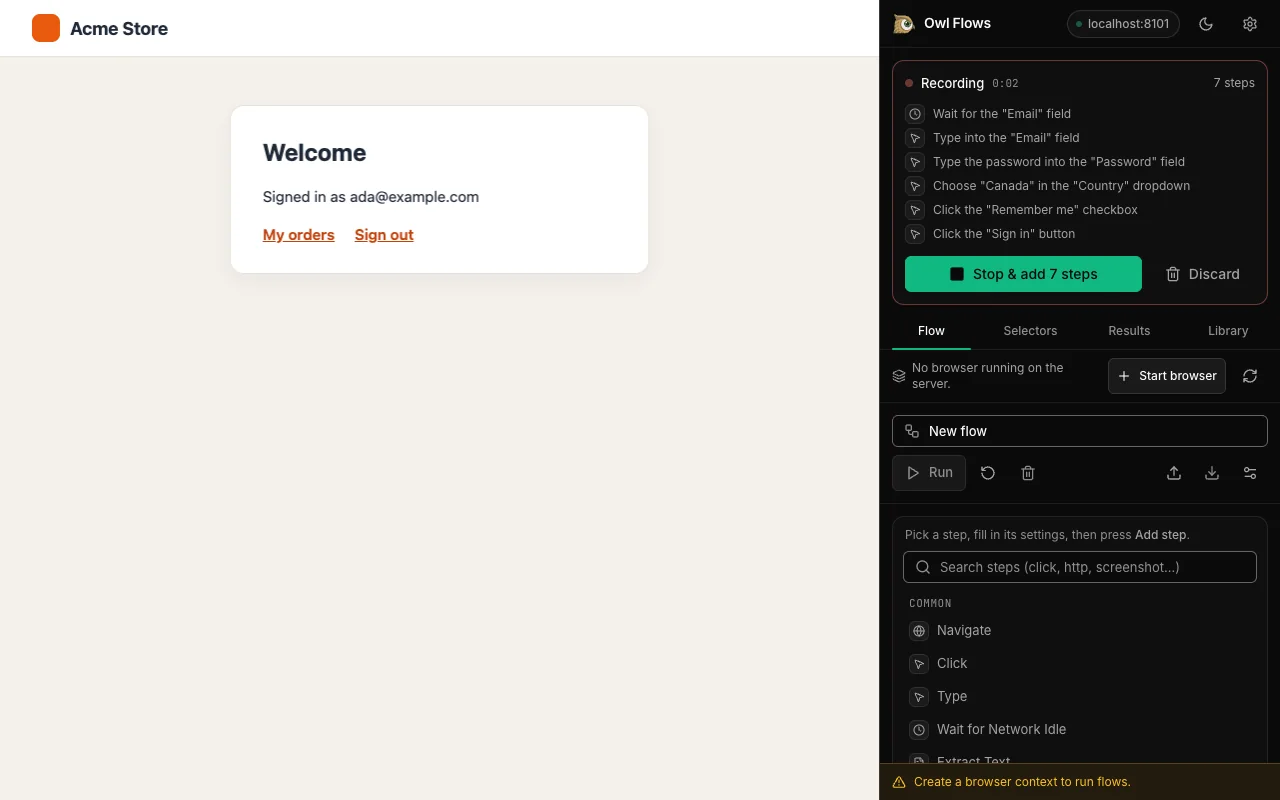
![Left, the Acme Store sign-in form with the Email field highlighted."email"], input[type="email"], input[placeholder="you@example.com"] and the description the "Email" field.](/images/extension/ext-selectors-dark-1280.webp)
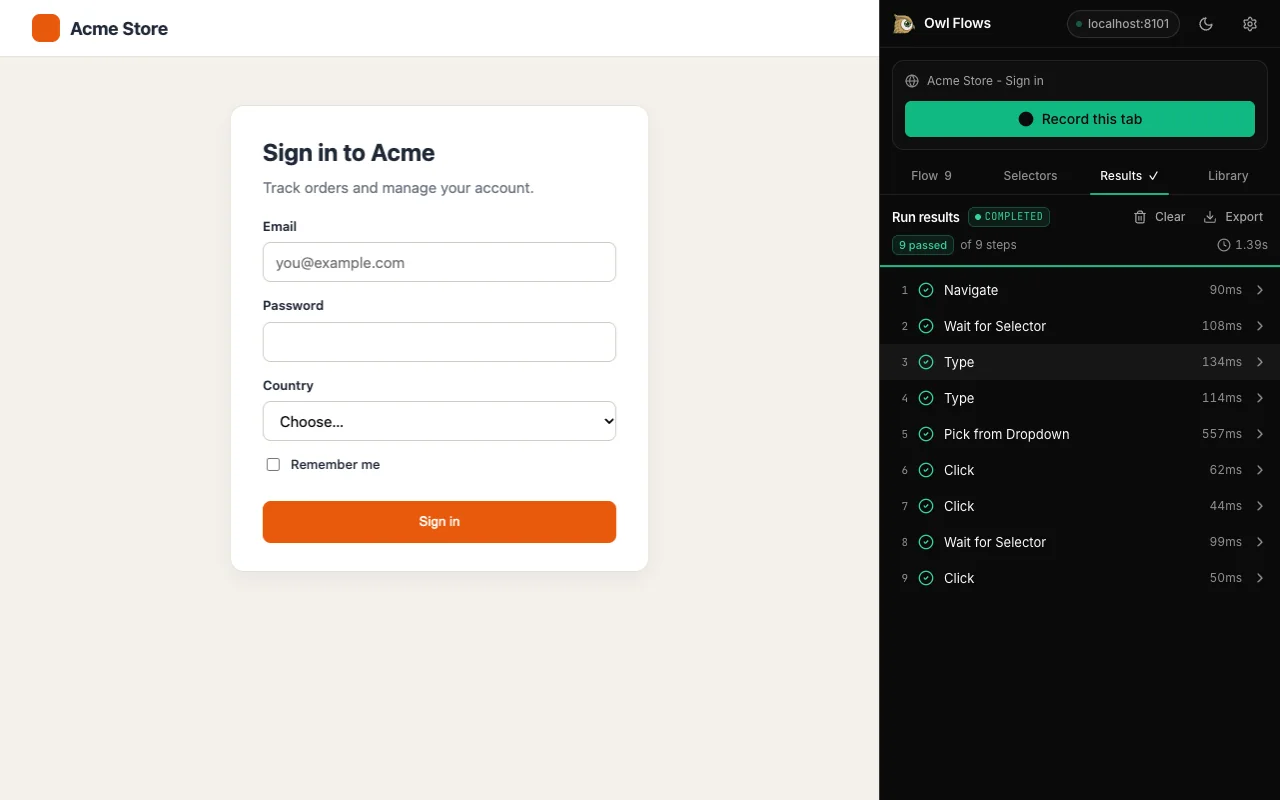
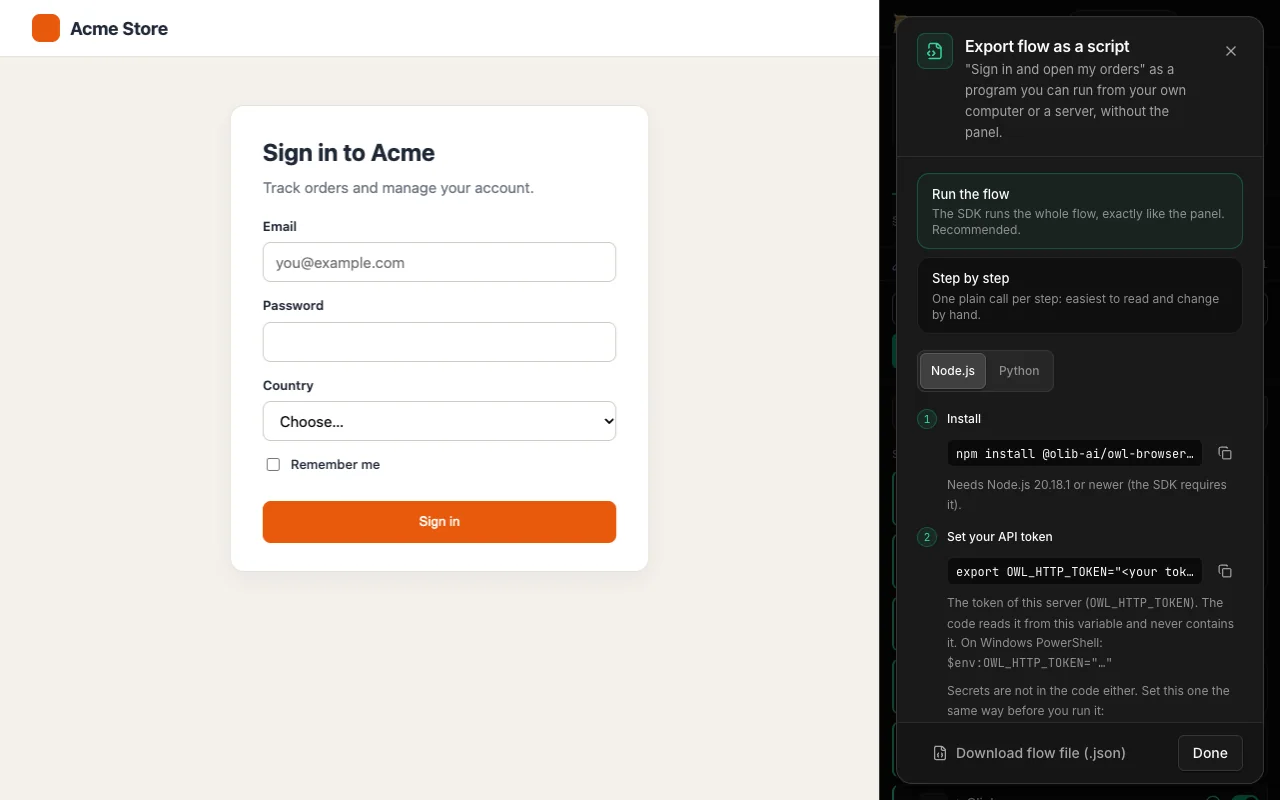
Real captures of version 2.0.0 in Chrome 157, connected to a local Owl server, recording on a local test store. From 640px wide, each image puts a capture of the page (left) and a capture of the side panel (right) side by side, because Chrome cannot capture its side panel together with the page; narrower screens show the side panel alone. No pixels are edited.
Record
- Clicks, typing, dropdown choices, checkboxes, Enter and Escape, and page navigations in your own Chrome tab become Owl flow steps.
- Works inside iframes (the frame switch is recorded) and on elements inside shadow DOM, which are targeted by a plain-language description.
- Typed passwords, one-time codes and card numbers are never recorded: the step stores a ${params.NAME} placeholder instead.
Edit and run
- Each element gets a stable CSS selector (test ids, ids, names, labels), alternatives and a plain-language description; Check highlights what a selector matches.
- The same flow editor as the Owl control panel: conditions, for-each loops, expected results, retries, timeouts and variables.
- Run the flow on your own Owl server from the side panel and see each step's result.
Export and keep
- Export as JSON (for the Node.js and Python SDKs and the control panel) or as ready-to-run Node.js or Python scripts.
- Import flow JSON files, including flows saved by version 1 of the extension.
- Flows are saved locally in Chrome. Nothing is synced or sent anywhere except the Owl server you connect, and the extension asks for access one site at a time.
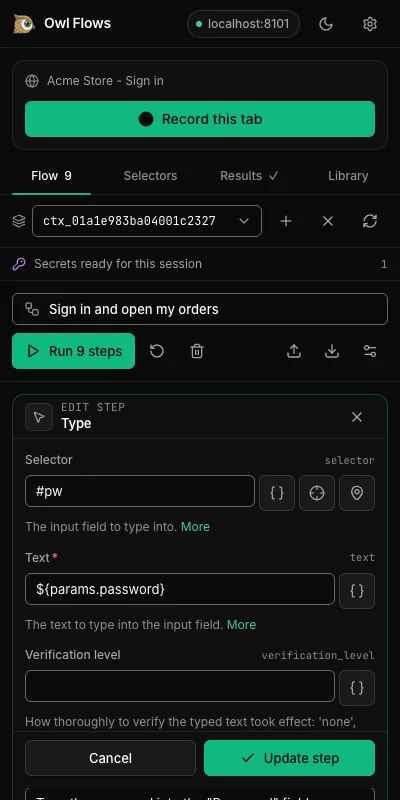
${params.password}, not what was typed. Side panel capture.The building blocks
Everything below is a field or a step in the flow editor, named as it appears there.
Steps, picked by name
The Add step picker lists 159 step types in 29 groups (Navigation, Interaction, Waiting, Extraction, AI Features, CAPTCHA, Cookies, Network / HTTP and more). Common picks sit on top: Navigate, Click, Type, Wait for Network Idle, Extract Text and Screenshot. Search with plain words such as "click" or "screenshot".
If Condition, with Then and Else
Check the previous result, or the result of a step you choose, optionally at a field path such as price. Thirteen checks: Equals, Not Equals, Contains, Does Not Contain, Starts With, Ends With, Greater Than, Less Than, Is Truthy, Is Falsy, Is Empty, Is Not Empty, Matches Regex. The steps under Then or Else run depending on the answer.
Repeat for Each Item
Run a group of steps once per item of a list, for example the products you read from a page. Inside the loop the current item is ${vars.item} and its position ${vars.index}; both names can be changed.
Variables from earlier steps
Capture as saves a step's result under a name that any later step can use as ${vars.NAME}. ${prev} is the previous result and ${params.NAME} a flow parameter. After a run, the variable picker lets you click a value in an earlier result instead of typing the path. An optional Extract (JSONPath or regex) keeps just the part you need.
Checks on results
An expectation turns a step into a test: Equals, Is One Of, Contains, Is Not Empty, Is Empty, Greater Than, Less Than, Length or Matches Regex, on the whole result or one field. If the check fails, the step fails and the run says what it expected and what it got.
Retries, timeouts, optional steps
Per step: retry up to N attempts with a backoff, a timeout in milliseconds, or mark it optional so a failure is recorded without stopping the flow. Per flow: a time limit for the whole run, named parameters with defaults, and required environment variables (the SDK skips the flow, with the reason, when one is missing).
How a run reports results
While a flow runs, the Run results panel fills in step by step: a status for each step (running, passed, failed), its duration, how many attempts a retried step needed, how many items a loop processed, and which branch an If took.
When a run fails, the reason is shown above the list with one of these classes:
- Tool error
- Expectation failed
- Nothing extracted
- Step timed out
- Flow timed out
- Stopped
- Skipped (environment)
A finished run can be exported as a JSON or Markdown report, with each step's parameters, result and check.
Export: JSON, Node.js or Python
Flow file (.json): the flat format both SDKs read. Import it back into any panel, keep it in version control, or run it from code.
Script, in Node.js or Python, two styles: Run the flow embeds the flow and runs it with FlowExecutor, so every feature works; Step by step writes one plain SDK call per step and is offered only when nothing in the flow needs the executor. For the demo flow the exporter declines Step by step with two reasons: "retry with 2 attempts and backoff is FlowExecutor behaviour" and "a for_each step loops over a run-time list; it needs the FlowExecutor".
We ran the exported Node.js script against our own server before publishing it:
$ node check-book-prices-runner.mjs
ok   step 0 browser_navigate (650 ms)
ok   step 1 browser_evaluate (648 ms)
ok   step 0 condition (0 ms)
ok   step 0 browser_navigate (371 ms)
ok   step 1 browser_extract_text (33 ms)
ok   step 0 condition (0 ms)
ok   step 0 condition (0 ms)
ok   step 0 browser_navigate (360 ms)
ok   step 1 browser_extract_text (30 ms)
ok   step 2 for_each (0 ms)
flow passed in 2139 ms
Run flows headless with the SDK
FlowExecutor runs a flow file in an existing browser context and returns a result per step (success, error, duration). Both snippets ran against our server before publishing; only the URL changed. Point them at your own instance, for example the Docker container on port 8080.
run-flow.mjs needs Node.js >= 20.18.1run_flow.py needs Python >= 3.12
import { FlowExecutor, OwlBrowser } from '@olib-ai/owl-browser-sdk';

const browser = new OwlBrowser({ url: 'http://localhost:8080', token: process.env.OWL_HTTP_TOKEN });
await browser.connect();
const contextId = await browser.createContext();
try {
  const flow = FlowExecutor.loadFlow('check-book-prices.json');
  const result = await new FlowExecutor(browser, contextId).execute(flow);
  console.log(result.success ? 'passed' : `failed: ${result.error}`, Math.round(result.totalDurationMs), 'ms');
} finally {
  await browser.closeContext({ context_id: contextId });
  await browser.close();
}import asyncio
import os
from owl_browser import FlowExecutor, OwlBrowser, RemoteConfig
async def main() -> None:
config = RemoteConfig(url="http://localhost:8080", token=os.environ["OWL_HTTP_TOKEN"])
async with OwlBrowser(config) as browser:
context_id = await browser.create_context()
try:
flow = FlowExecutor.load_flow("check-book-prices.json")
result = await FlowExecutor(browser, context_id).execute(flow)
print("passed" if result.success else f"failed: {result.error}", round(result.total_duration_ms), "ms")
finally:
await browser.close_context(context_id=context_id)
asyncio.run(main())The executor also accepts a notifier that calls your code when a flow starts, succeeds, fails or is skipped; you choose where the message goes. Installation and the rest of the API: Node.js SDK and Python SDK.
Limits worth knowing
- A flow runs its steps one at a time, top to bottom, in the browser context the executor is given.
- Greater Than and Less Than in an If compare numbers only: a price read as text such as "£51.77" has to be turned into a number first (the demo does this in its Evaluate JavaScript step).
- Repeat for Each Item needs a list (or text holding a JSON list); anything else fails the step with an error.
- Step-by-step script export is not available for flows with loops, retries and similar executor features.
- Flows drive a real site, so pages that load slowly need a wait or a retry; the demo's stock check needed a second attempt on its first book in the recorded run.
Questions
Do I need to know how to code to build a flow?
Can a flow run without the control panel?
FlowExecutor from the Node.js or Python SDK, or export a ready-made script that does exactly that. It runs against your own Owl Browser instance.What happens when a step fails?
Can I export a flow as plain step-by-step code?
Is the demo on this page a live browser?
Related: tool reference, pricing, FAQ.