How an Autonomous Agent Beat a 2200-Rated Chess Bot: Without a Single Screenshot

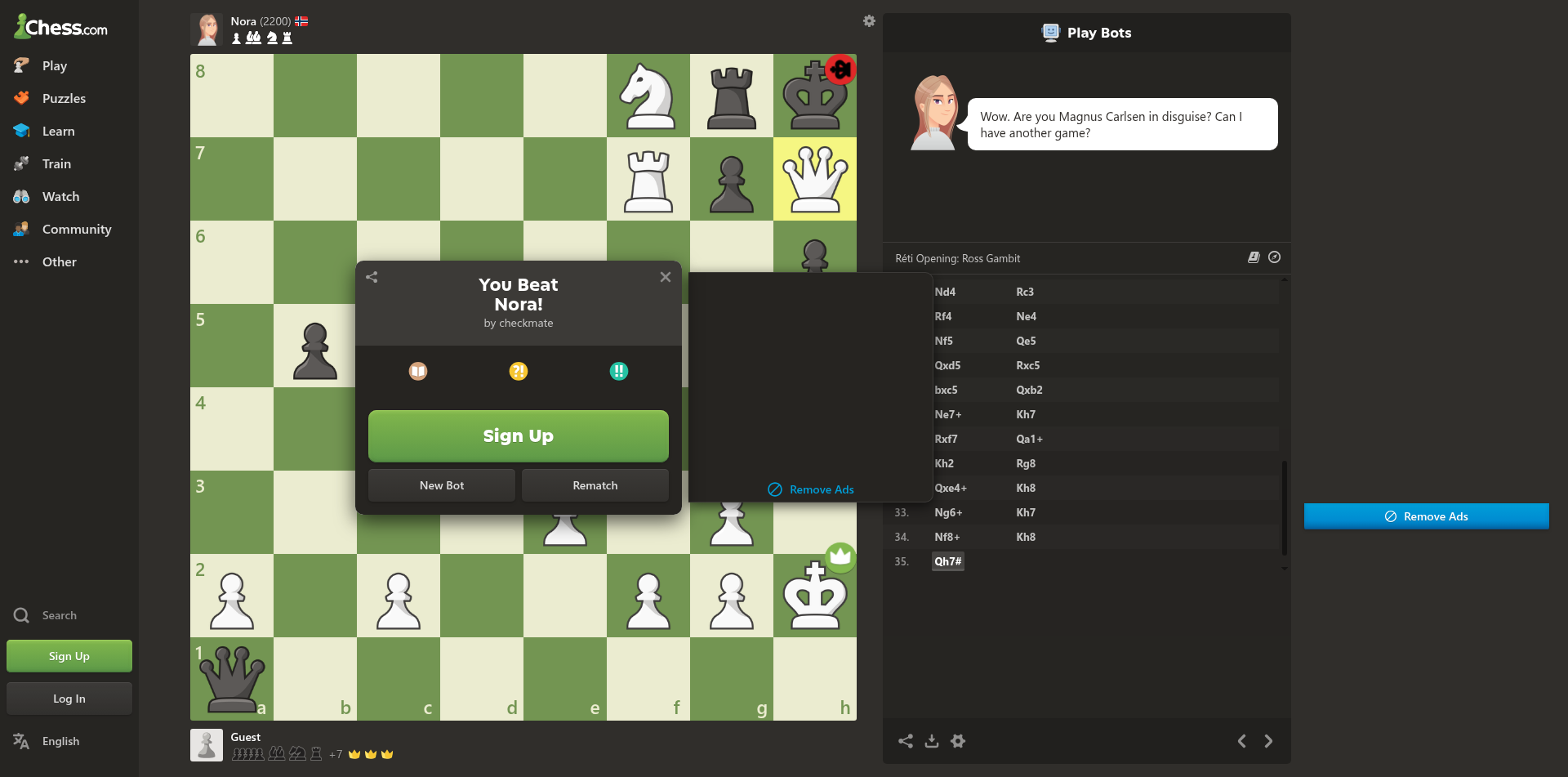
This week, Steffi, our autonomous agent platform, also built here at Olib AI, played a full game of chess against Nora, a 2200-rated Master-level bot on chess.com. 35 moves in, Steffi delivered mate with Qh7#. Nora even conceded in the chat: "Wow. Are you Magnus Carlsen in disguise?"
The interesting detail, at least for us, is that Steffi never looked at the game. Not once. Across all 35 moves, no screenshot was taken, no vision model was invoked, no OCR was ever run. The entire game was read from the page, not seen.
Here's how `browser_get_page_map` made that possible.
The Page Map, Tuned for Chess
When an AI agent calls `browser_get_page_map` on a chess.com page, Owl Browser doesn't return a generic DOM dump. Our renderer detects that the page hosts a chess board and emits a response tailored to the domain: the current position in Unicode, the side to move, the move history in SAN, the pixel-coordinate formula for each square, and every game-control button with its exact pixel coordinates.
Here's the actual response on a starting position:
## Chess Board

```
8 ♜ ♞ ♝ ♛ ♚ ♝ ♞ ♜
7 ♟ ♟ ♟ ♟ ♟ ♟ ♟ ♟
6 · · · · · · · ·
5 · · · · · · · ·
4 · · · · · · · ·
3 · · · · · · · ·
2 ♙ ♙ ♙ ♙ ♙ ♙ ♙ ♙
1 ♖ ♘ ♗ ♕ ♔ ♗ ♘ ♖
  a b c d e f g h
```

**Turn:** White

**Material:** White 39 vs Black 39 (equal)

**How to move:** click source square, then destination square.
Formula: square XxY where X=233+(file*102)+51, Y=66+((8-rank)*102)+51
Examples: e2=692x729, e4=692x525

**Game actions:** Resign (1169x855) | Undo (1330x855) | Show Hint (1492x855)
That's the entire game state as a structured text payload: pieces, squares, coordinates, and actions. Any text-based LLM can parse it. Any chess engine can consume it directly as input. No vision model required.
The Agent Loop
With the page map doing the heavy lifting, Steffi's game loop collapsed to four simple steps:
- Call `browser_get_page_map`: receive the board as Unicode text plus click coordinates.
- Pass the board text to the chess engine: receive `from` and `to` squares (e.g. e2 → e4).
- Compute pixel coordinates from the formula in the page map: call `browser_click` twice, once for the source square, once for the destination.
- Wait for the opponent's reply, then loop.
That's it. No custom DOM queries, no `MutationObserver`, no headless vision pipeline, no hand-tuned CSS selectors. The same four steps worked on move 1 and on the move that delivered mate.
By the Numbers
Here's what the full run actually cost Steffi's orchestration layer end-to-end:
| Metric | Value |
|---|---|
| Chess moves played | 35 (game ended with Qh7#) |
| Wall-clock duration | 968 seconds (16 min 8 sec) |
| Total tool calls | 62 |
| LLM tokens consumed | 69,588 |
The 69,588 tokens is only what the orchestrating LLM consumed: reading page_map responses, building the move history, composing HTTP requests. Zero tokens were spent on move calculation itself. The chess engine is native Rust and runs as a local HTTP call, so every position analysis was effectively free from a token-budget perspective.
That split matters. A vision-model variant of the same agent (screenshot the board, OCR or GPT-4V to read it, text model to pick the move) would easily spend 10 to 20 times more tokens for the same game, plus several seconds of extra latency per turn. Owl Browser's page_map puts that saving on the table for every task, not just chess.
Reading Beats Seeing
The broader pattern here is one we've been pushing since we launched `browser_get_page_map` in February: when you can give an agent a structured view of a page, you almost always should. Vision models are heavy, slow, and error-prone on text-dense or dynamic UIs like chess boards, dashboards, tables, spreadsheets, and forms. They burn inference cycles turning pixels into structure that the DOM already had in the first place.
Owl Browser skips that round trip. When our renderer recognizes what's on the page, we hand the agent the semantic model directly. Not a screenshot to interpret. The data itself, already shaped for the task.
Agents shouldn't have to see. They should be able to read.
What's Next
Chess is one domain where we've invested in a tuned page-map response. We're rolling out similar specializations for other common agent targets like trading dashboards, issue trackers, admin panels, and booking flows. If there's a site you work with daily and wish Owl Browser understood natively, let us know.
35 moves, zero screenshots, one Master-level bot beaten. That's what a structured page map gets you. And it's also why we build both halves of the stack at Olib AI: the agents that do the work (steffi.ai) and the browser they do it in (owlbrowser.net). Read more about the tool in our launch post at /blog/introducing-browser-get-page-map.
Want to automate seamlessly?
Owl Browser bypasses all sophisticated bot detections effortlessly.